背景
生成AIの発達でデータインテグレーションの重要性がどんどん増しています。
ビジネスデータなどはGoogle Workspaceで管理している企業も多く、そこにあるスプレッドシート情報であったりGoogleDriveのデータを内製のAIシステムに自動連携したい、といった要望が出てきます。
ただ一方でセキュリティのためGoogle Workspace側でドメイン制約をつけている所も多く、そうなるとGoogle Cloud側からは直接アクセスできないケースがあります。
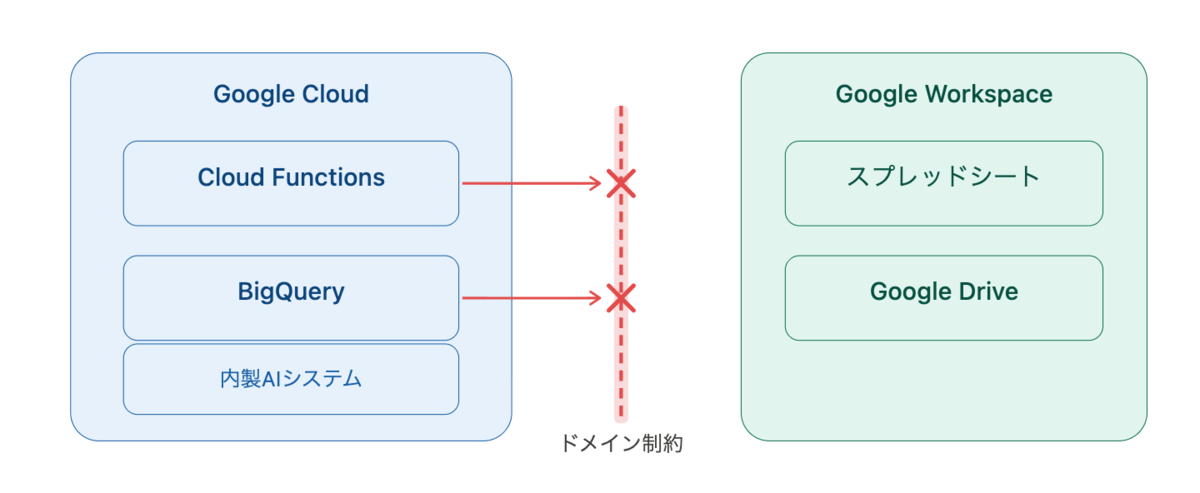
そうなるとGoogle Workspace側をトリガーにGoogle Cloud側へアクセスさせることになりますが、GAS (Google Apps Script) で自動連携の仕組みは作れてもその際の鍵管理をどうするか考える必要があります。
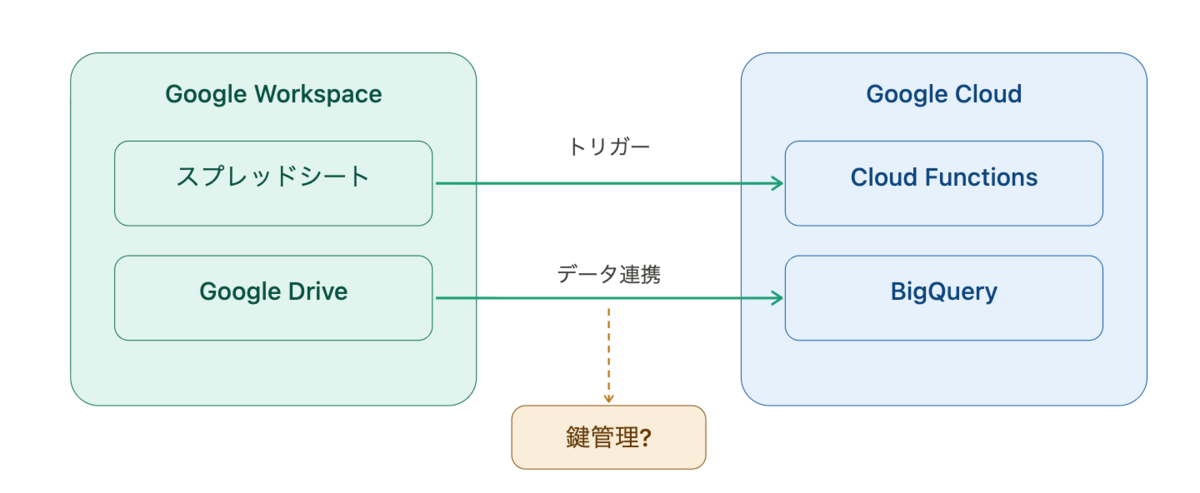
そこで今回はそういった状況でもセキュアに管理するための方法を紹介します。
方針
大きく3段階あります。
- スクリプトプロパティを使う
- Secret Manager で管理し、GASユーザにIAM権限を付与
- 専用のサービスアカウントを用意し、GASユーザと紐付けてImpersonationする
上の方ほど管理が楽な一方、下に行くほどセキュアになります。
1. スクリプトプロパティを使う
方法
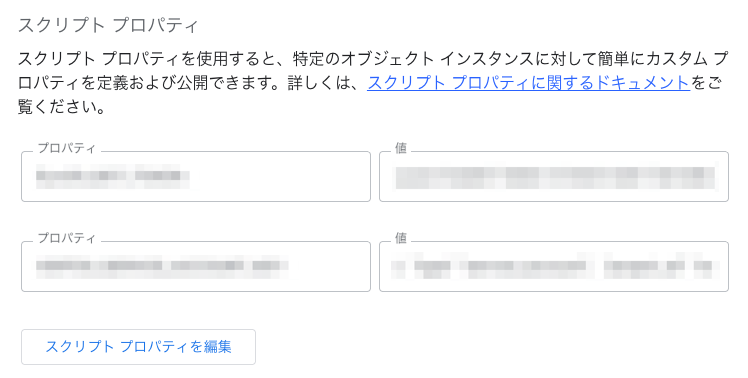
GASの歯車マークを押すと、下の方にスクリプトプロパティという環境変数的な扱いができる項目があります。
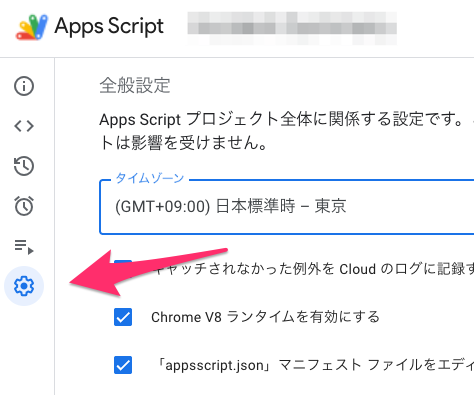
これを使うことで、GASのコード上にべた書きをしないで管理することが可能になります。
課題点
課題としては以下があります。
- スプレッドシートの編集者はシークレットを見ることができる
- 暗号化・アクセスログ・ローテーションの仕組みがない
なので単発での利用はOKとしても、このユースケースがどんどん増えるとリスクになるので次のフェーズに移ると良いです。
2. Secret Manager で管理し、GASユーザにIAM権限を付与
環境変数はスクリプトプロパティを使いつつ、機密情報の管理はSecret Managerに任せるやり方です。
これによって
- IAMで閲覧権限を細かく制御
- 監査ログ
- バージョン管理・ローテーション
といった先ほどの課題が解消されます。
Secret Manager の用意
gcloud secrets create YOUR_SECRET_ID \
  --replication-policy=user-managed \
  --locations=asia-northeast1
シークレットの値を登録します。
echo -n 'my-api-key-value' | gcloud secrets versions add YOUR_SECRET_ID --data-file=-
権限の付与
roles/secretmanager.secretAccessor を付与します。
you@example.comというGASユーザだとすると、
gcloud secrets add-iam-policy-binding YOUR_SECRET_ID \
  --member="user:you@example.com" \
  --role="roles/secretmanager.secretAccessor"
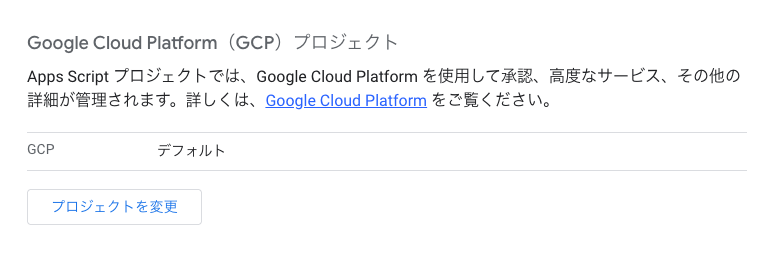
GAS に Google Cloud プロジェクトを紐付け
先ほどのように歯車アイコンのところから、Google Cloud プロジェクトを紐付けておきます。
GASマニフェスト設定 (appsscript.json)
次にoauthScopes を明示的に設定する必要があります。
{
  "oauthScopes": [
    "https://www.googleapis.com/auth/script.external_request",
    "https://www.googleapis.com/auth/secretmanager"
  ]
}
これは oauthScopes を明示すると、GASの自動スコープ推論が無効になるため、使用中の全スコープを列挙する必要があるためです。
コード
GAS上では次のようなコードになるでしょう。
const SECRET_MANAGER_API_BASE = 'https://secretmanager.googleapis.com/v1';

/**
 * Secret Manager の Secret Version にアクセスして、UTF-8 文字列として返す。
 * @param {string} versionResourceName
 *   例: projects/my-proj/secrets/my-secret/versions/3
 *       projects/my-proj/secrets/my-secret/versions/latest
 * @return {string}
 */
function accessSecretVersion(versionResourceName) {
  if (!versionResourceName) {
    throw new Error('versionResourceName is required.');
  }

  const url = `${SECRET_MANAGER_API_BASE}/${versionResourceName}:access`;
  const response = UrlFetchApp.fetch(url, {
    method: 'get',
    headers: {
      Authorization: `Bearer ${ScriptApp.getOAuthToken()}`,
    },
    muteHttpExceptions: true,
  });

  const status = response.getResponseCode();
  const text = response.getContentText();

  if (status !== 200) {
    let message = text;
    try {
      const json = JSON.parse(text);
      message = json?.error?.message || text;
    } catch (_) {
      // JSON でなければそのまま使う
    }
    throw new Error(`Secret Manager API error (${status}): ${message}`);
  }

  const json = JSON.parse(text);
  const encoded = json?.payload?.data;
  if (!encoded) {
    throw new Error('Secret Manager response does not contain payload.data.');
  }

  const bytes = Utilities.base64Decode(encoded);
  return Utilities.newBlob(bytes).getDataAsString('UTF-8');
}

/**
 * Secret Manager の指定バージョンを取得する。
 * @param {string} projectId
 * @param {string} secretId Secret 名のみ
 * @param {string} [version='latest']
 * @return {string}
 */
function accessSecret(projectId, secretId, version = 'latest') {
  if (!projectId) {
    throw new Error('projectId is required.');
  }
  if (!secretId) {
    throw new Error('secretId is required.');
  }
  if (!version) {
    throw new Error('version is required.');
  }

  const versionResourceName =
    `projects/${projectId}/secrets/${secretId}/versions/${version}`;

  return accessSecretVersion(versionResourceName);
}
使う時はこんな感じです。
const secret = accessSecret('my-proj', 'my-secret');
const secretV3 = accessSecret('my-proj', 'my-secret', '3');
ポイント
- 権限が適切に紐付いていれば、
getOAuthToken()でSecretManagerにアクセスできるトークンが取得できる - latest を使う呼び出しをラップ
課題点
課題としては以下があります。
- ユーザー×権限の数だけIAM設定が必要
- Google Cloudの色んなAPIを使いたいケース
- 退職者管理(権限剥奪、管理者変更)がしにくい
3. 専用のサービスアカウントを用意し、GASユーザと紐付けてImpersonationする
Google Cloudの他のAPIも使いたいようなケースではサービスアカウントと紐付けるやり方がベストです。
権限の設定
サービスアカウントを作成し、権限を付与します。
Secret Managerなら
gcloud secrets add-iam-policy-binding YOUR_SECRET_ID \
  --member="serviceAccount:YOUR_SA@PROJECT_ID.iam.gserviceaccount.com" \
  --role="roles/secretmanager.secretAccessor"
他のAPIとして、例えばGCSバケットアクセスさせたいとすると
gcloud storage buckets add-iam-policy-binding gs://BUCKET_NAME \
  --member="serviceAccount:YOUR_SA@PROJECT_ID.iam.gserviceaccount.com" \
  --role="roles/storage.objectAdmin"
最後にimpersonationするための権限を、GASユーザに紐付けます。
GASユーザをyou@example.comユーザとします。
gcloud iam service-accounts add-iam-policy-binding YOUR_SA@PROJECT_ID.iam.gserviceaccount.com \
  --member="user:you@example.com" \
  --role="roles/iam.serviceAccountTokenCreator" \
  --project=PROJECT_ID
GASマニフェスト設定 (appsscript.json)
oauthScopes は cloud-platform を使います。
{
  "oauthScopes": [
    "https://www.googleapis.com/auth/script.external_request",
    "https://www.googleapis.com/auth/cloud-platform"
  ]
}
コード
GAS上では次のようなコードにします。
const IAM_BASE = 'https://iamcredentials.googleapis.com/v1';
const SECRET_BASE = 'https://secretmanager.googleapis.com/v1';
const STORAGE_BASE = 'https://storage.googleapis.com/storage/v1';

/**
 * 共通 JSON fetch
 */
function fetchJson(url, options, apiName) {
  const res = UrlFetchApp.fetch(url, {
    muteHttpExceptions: true,
    ...options,
  });

  const status = res.getResponseCode();
  const text = res.getContentText();

  let json;
  try {
    json = text ? JSON.parse(text) : null;
  } catch (_) {
    json = null;
  }

  if (status < 200 || status >= 300) {
    const message = json?.error?.message || text || 'Unknown error';
    throw new Error(`${apiName} failed (${status}): ${message}`);
  }

  return json;
}

/**
 * Service Account を impersonate してアクセストークン取得
 */
function generateAccessToken(serviceAccountEmail) {
  const url =
    `${IAM_BASE}/projects/-/serviceAccounts/` +
    `${encodeURIComponent(serviceAccountEmail)}:generateAccessToken`;

  const json = fetchJson(
    url,
    {
      method: 'post',
      contentType: 'application/json',
      headers: {
        Authorization: `Bearer ${ScriptApp.getOAuthToken()}`,
      },
      payload: JSON.stringify({
        scope: ['https://www.googleapis.com/auth/cloud-platform'],
        lifetime: '3600s',
      }),
    },
    'IAMCredentials.generateAccessToken'
  );

  if (!json?.accessToken) {
    throw new Error('No accessToken in response');
  }

  return json.accessToken;
}

/**
 * Secret Manager: 最新バージョン取得
 */
function getSecret(projectId, secretId, serviceAccountEmail) {
  const token = generateAccessToken(serviceAccountEmail);

  const name =
    `projects/${projectId}/secrets/${secretId}/versions/latest`;

  const url = `${SECRET_BASE}/${name}:access`;

  const json = fetchJson(
    url,
    {
      method: 'get',
      headers: {
        Authorization: `Bearer ${token}`,
      },
    },
    'SecretManager.access'
  );

  const encoded = json?.payload?.data;
  if (!encoded) {
    throw new Error('No payload.data in Secret Manager response');
  }

  return Utilities.newBlob(
    Utilities.base64Decode(encoded)
  ).getDataAsString('UTF-8');
}

/**
 * GCS: オブジェクト本文を取得(テキスト)
 */
function getGcsObjectText(
  bucketName,
  objectName,
  serviceAccountEmail
) {
  const token = generateAccessToken(serviceAccountEmail);

  // オブジェクト名全体をエンコードすると、フォルダ階層が壊れることがあるため注意
  const encodedObjectName = objectName.split('/').map(encodeURIComponent).join('/');
  const url =
    `${STORAGE_BASE}/b/${encodeURIComponent(bucketName)}` +
    `/o/${encodeURIComponent(encodedObjectName)}?alt=media`;

  const res = UrlFetchApp.fetch(url, {
    method: 'get',
    headers: {
      Authorization: `Bearer ${token}`,
    },
    muteHttpExceptions: true,
  });

  const status = res.getResponseCode();

  if (status < 200 || status >= 300) {
    const text = res.getContentText();
    let message = text;
    try {
      const json = JSON.parse(text);
      message = json?.error?.message || text;
    } catch (_) {}
    throw new Error(`GCS.objects.get failed (${status}): ${message}`);
  }

  return res.getBlob().getDataAsString('UTF-8');
}
使う際は
function sampleGetSecret() {
  const secret = getSecret(
    'my-project',                                // projectId
    'my-secret',                                 // secretId
    'my-sa@my-project.iam.gserviceaccount.com'   // SA
  );

  Logger.log(secret);
}
や
function sampleGetGcsObject() {
  const content = getGcsObjectText(
    'my-bucket',                                 // bucket
    'path/to/file.txt',                          // object
    'my-sa@my-project.iam.gserviceaccount.com'   // SA
  );

  Logger.log(content);
}
のようにします。
まとめ
これまでのまとめです。
| 方式 | ユーザーへのIAM付与 | GCPプロジェクト紐付け | 適するケース |
|---|---|---|---|
| スクリプトプロパティ | 不要 | 不要 | 小規模・個人、まずは動かしたい時 |
| Secret Manager (直接) | secretAccessor |
必要 | 外部APIキーのみをセキュアに扱いたい時 |
| SA Impersonation | serviceAccountTokenCreator |
必要 | 複数のGCPリソース(AI, GCS等)を横断的に使う時 |
このようにユースケースに合わせて、適切に権限管理ができると良いでしょう。
